Why Your Website Is Not Getting Leads (And How to Fix It)
Getting traffic but no inquiries? Learn why your website is not getting leads and how to fix it, from unclear messaging and slow speed to weak forms, missing trust signals, and poor landing pages. Simple steps to improve website lead generation.
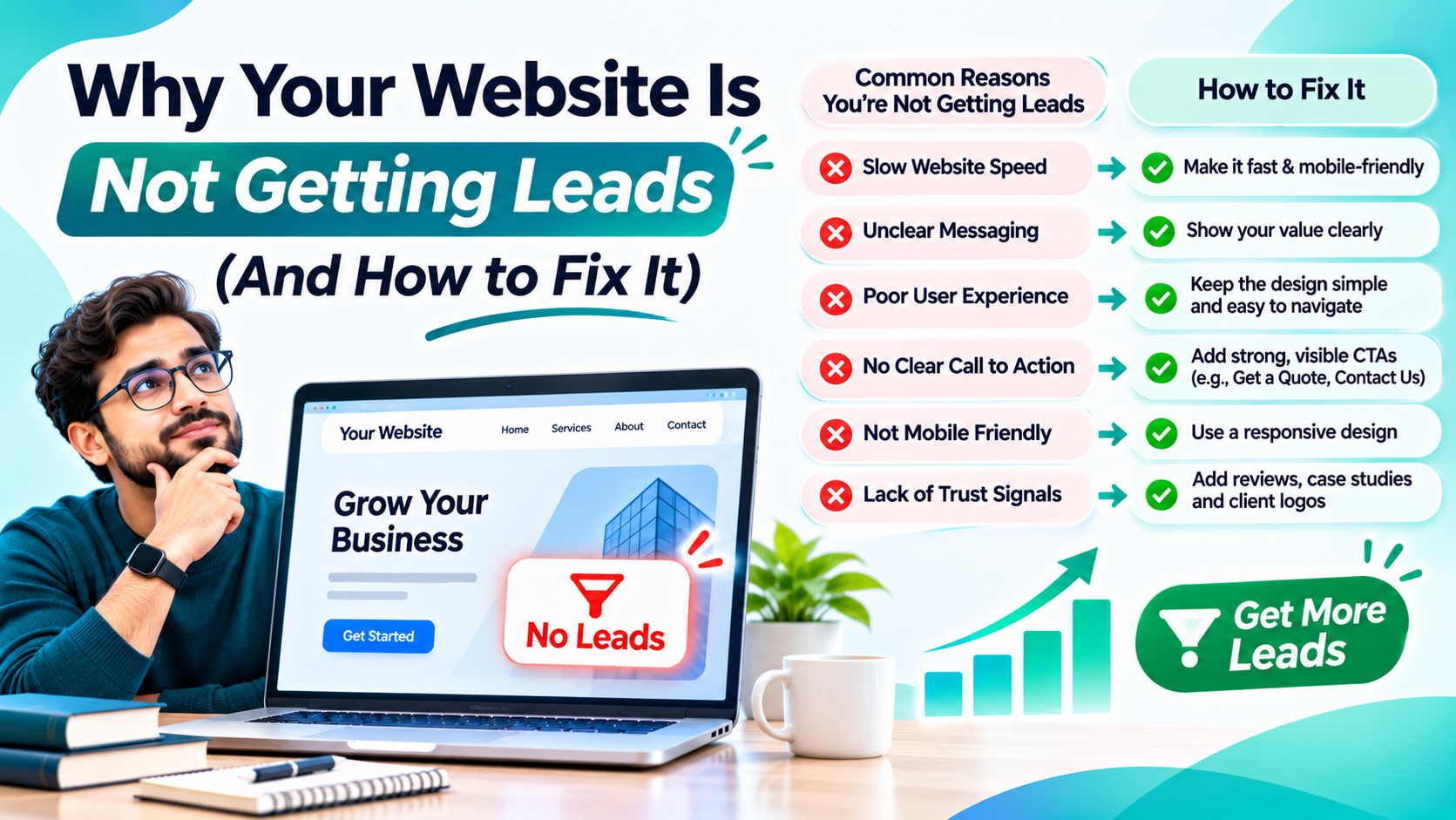
If that sounds familiar, you’re not alone. Plenty of websites get decent traffic and almost no inquiries. The good news is that this is usually fixable, and the problem is rarely as complicated as it seems.
This guide walks through the most common reasons your website isn’t getting leads, and exactly what to do about each one. Strong website lead generation isn’t about luck or fancy design. It’s about removing the things that make visitors leave and adding the things that make them reach out.
First, Figure Out Where the Problem Is
Before changing anything, find out which of these situations you’re in:
- Not enough traffic: Very few people are visiting at all.
- Wrong traffic: Plenty of visitors, but they’re not your customers.
- Right traffic, no action: The right people arrive, but they don’t contact you.
Each one needs a different fix. Check Google Analytics and Search Console to see how many visitors you get, where they come from, and which pages they leave from. This simple step saves you from guessing.
1. Your Message Is Unclear
Visitors decide in a few seconds whether a site is right for them. If your homepage headline says “Welcome to our website” or “Excellence in every solution,” they won’t stick around to figure out what you do.
A strong headline answers three questions right away: What do you offer? Who is it for? What should I do next?
Compare these two:
- Weak: “Innovative Solutions for Modern Businesses”
- Strong: “Web Design and SEO for Small Businesses in Lucknow. Get a Free Quote.”
The second one tells people exactly where they are and what to do.
2. There’s No Clear Call to Action
Many websites forget to ask for the lead. If someone has to hunt for your phone number or contact form, most won’t bother.
Fix it by:
- Placing a clear button like “Get a Free Quote” or “Book a Call” near the top of every page
- Repeating the call to action at the end of each section
- Showing your phone number in the header, especially on mobile
- Using action words that describe the benefit, not just “Submit”
One main action per page works better than offering five different options.
3. Your Website Is Slow
People are impatient. If your pages take too long to load, many visitors will leave before they see a single word. Slow speed also hurts your Google rankings.
Common culprits are huge images, too many plugins, cheap hosting, and bloated code. Compress your images, remove plugins you don’t use, enable caching, and consider upgrading your hosting. Run your site through Google PageSpeed Insights to see exactly what’s slowing it down.
4. It Doesn’t Work Well on Mobile
Most people now browse on their phones. If your site has tiny text, buttons that are hard to tap, or layouts that break on small screens, you’re losing leads every day.
Open your website on your own phone right now. Try to find your contact details and send an inquiry. If it feels frustrating to you, it’s frustrating for your customers too.
5. Your Forms Ask Too Much
Long forms scare people away. Every extra field gives someone another reason to quit.
For most service businesses, name, phone number, and a short message are enough. You can collect more details during the follow-up. If you need to qualify leads, add one simple question instead of ten.
Also check that your form actually works. It sounds obvious, but broken forms and emails landing in spam have quietly cost many businesses real money. Test yours this week.
6. You’re Missing Trust Signals
People hesitate to contact a business they know nothing about. Trust is what turns a browser into a lead.
Add proof that you’re real and reliable:
- Customer reviews and testimonials, ideally with names and photos
- Case studies with real results
- Client logos and certifications
- A real About page with your team’s faces and story
- Clear contact details and a physical address, if you have one
Even a few genuine reviews on your homepage can noticeably improve how many people reach out.
7. You’re Not Using Dedicated Landing Pages
This is one of the biggest missed opportunities. If you run ads or send email campaigns and drop people onto your homepage, you’re making them work too hard.
Landing pages are focused pages built around a single goal and a single offer. A good one includes:
- A headline that matches the ad or email people clicked
- A short explanation of the benefit
- Social proof like reviews or results
- One clear call to action and a simple form
- No distracting menus or unrelated links
When someone clicks an ad about “kitchen renovation in Lucknow,” they should land on a page about exactly that. Matching the message from the ad to the page is a core part of conversion rate optimization, and it often makes a bigger difference than any design change.
8. Your Content Doesn’t Answer Real Questions
Visitors want answers. If your service pages are thin, vague, or full of buzzwords, they’ll go elsewhere to find clearer information.
Each service page should explain what you do, who it’s for, how it works, roughly what it costs or how pricing works, and what happens after someone contacts you. Add an FAQ section to handle common doubts. Honest, specific content builds confidence and also helps your search rankings.
9. You’re Attracting the Wrong Traffic
Sometimes the problem isn’t the website at all. If you rank for keywords that don’t match what you sell, or your ads target the wrong audience, visitors arrive with the wrong intent and leave quickly.
Review which search terms and sources bring people to your site. Focus on keywords that show buying intent, like “hire,” “near me,” “pricing,” and “services,” rather than only broad informational terms. If you’d like help finding and ranking for the right keywords, you can see how GlanceTechy’s SEO services can bring in more qualified visitors.
10. You’re Not Tracking Anything
If you don’t know which pages, sources, or campaigns generate leads, you can’t improve them. Set up tracking for form submissions, phone calls, and button clicks. Tools like Google Analytics, Google Tag Manager, and heatmap software show you where people click, scroll, and drop off.
This data is the foundation of conversion rate optimization. Instead of guessing what’s wrong, you can see it.
11. You Respond Too Slowly
A lead who contacts you and waits half a day for a reply has often moved on. Speed matters a lot.
Set up an instant auto-reply, enable notifications on your phone, and aim to respond within minutes during business hours. Add a click-to-call button and WhatsApp option if your customers prefer messaging. Many websites lose leads not because they failed to generate them, but because they failed to follow up.
A Simple Conversion Rate Optimization Routine
You don’t need a big team to start improving. Try this monthly routine:
- Review your data. Which pages get traffic but no leads?
- Pick one page to improve. Start with your homepage or top service page.
- Change one thing at a time. A headline, a button, or a form.
- Wait for enough data. Give each change a few weeks before judging it.
- Keep what works. Repeat the process on the next page.
Small, steady improvements add up. Raising your conversion rate from 1% to 3% means triple the leads from the same traffic, without spending a rupee more on marketing.
When to Get Professional Help
If you’ve fixed the basics and still aren’t seeing results, or you simply don’t have the time, an expert review can spot issues you’ve stopped noticing. A good team will audit your site, check your tracking, and give you a clear, prioritized plan rather than a vague list of ideas.
If you want a second pair of eyes on your site, you can learn more about GlanceTechy and how we help businesses turn visitors into customers.
Final Thoughts
A website that doesn’t generate leads is almost never a lost cause. In most cases, it comes down to unclear messaging, weak calls to action, slow speed, poor mobile experience, missing trust, or no real strategy behind the traffic.
Start with the simple fixes: clarify your headline, add a visible call to action, speed up your pages, shorten your forms, and show real proof. Then build better landing pages and track what happens. With steady effort, website lead generation becomes a reliable part of your business instead of a mystery.